
Your first deposit
What to prepare and what to expect from your first liquidity position.
Prepare your wallet
Use a wallet that supports Robinhood and keep native ETH available for gas. A deposit normally needs both assets in the selected pool, plus enough ETH for any approvals and wrapping steps.
Check the token address against its original source before searching; a familiar name or logo can be copied by another contract.
Choose the market
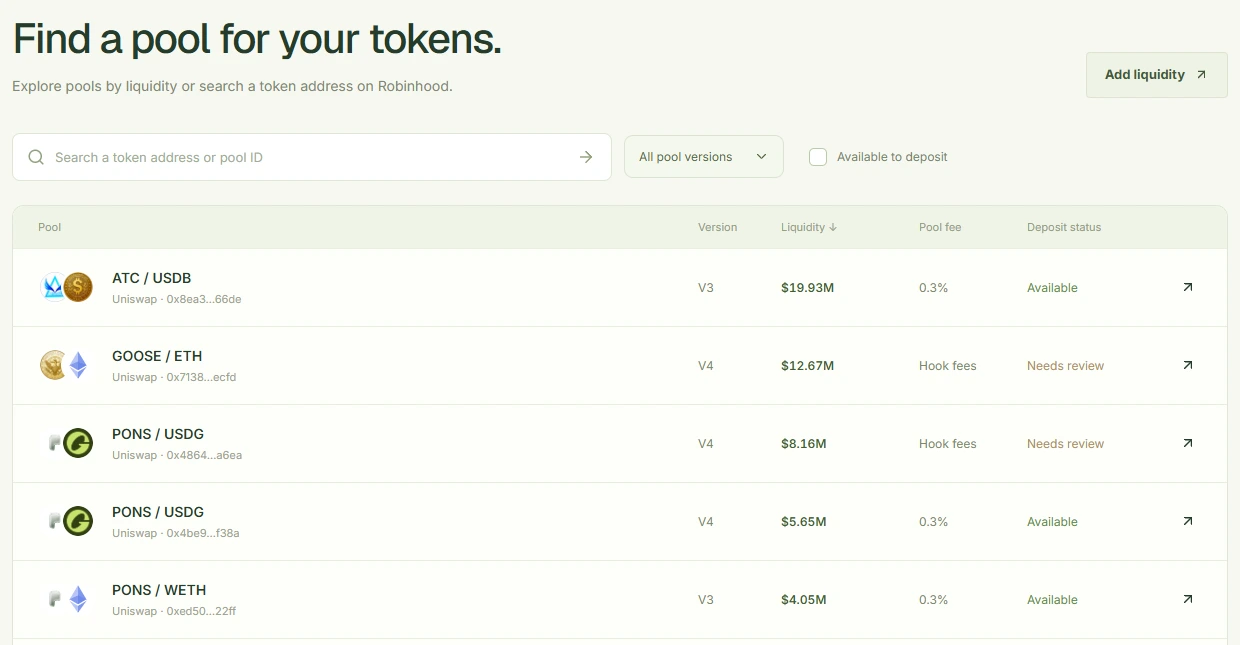
Open Pools to compare tracked community-token markets by liquidity, or paste a token address to find its pools. Check the paired asset, version, fee and deposit status before choosing a market.
Pool liquidity is the value indexed for that market. It does not predict how much your position will earn.
Enter and review your amounts
Choose the asset amount you want to enter, then read the paired amount that Flea calculates. For V3 and V4, choose full range or a range around the current price.
Review the maximum amounts, owner address, range and slippage before confirming. Your wallet may ask for more than one transaction, and an approval alone does not create a position.

Keep the receipt
Once the deposit confirms, open Positions to see the position held by your wallet. Keep the explorer receipt if you close the page or need to recover a delayed position entry.
If a transaction is still pending, check that receipt before submitting another deposit.